Think back to the last time you did a jigsaw puzzle.
Unless you’re some kind of masochist, you didn’t build it in one long chain, individual piece by individual piece.
You worked on a chunk here, a chunk there, and eventually, found a connector piece between them.
Writing emails works the same way because a good email has an underlying structure.
So you don’t have to write it in the order the reader reads it. That’s more difficult since you’re restricting how you can write the email.
Many of the best writers, therefore, write each “section” of that structure in whatever order works best for them, then “weld” them together into a finished email.
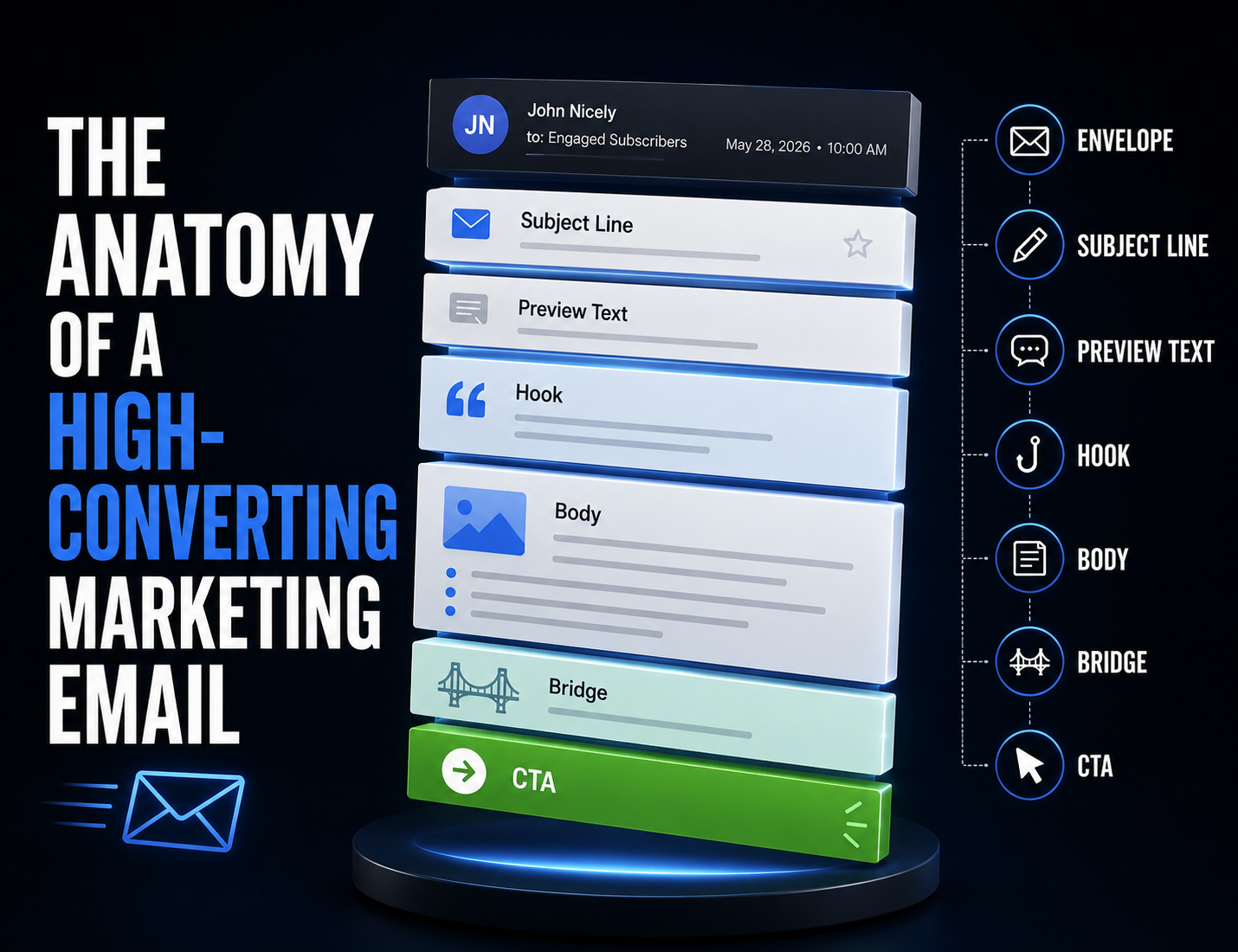
To that end, this article walks through the anatomy of a high-converting email and what order I (generally) “complete” each section.
I’ve presented them in the order they appear in an email, but here’s the order I write them in:
- Envelope
- Body
- CTA
- Bridge
- Hook
- Subject lines/preview text
Although sometimes I’ll move the envelope to the end.
Speaking of which, let’s start with the “envelope” since you’re probably confused about how an email has one.
| Table of Contents |
| The “Envelope” — The Pre-Email Metadata The Email Itself Design Considerations Know the Parts, Write Better Emails What To Do Next |
The “Envelope” — The Pre-Email Metadata
Before you rip open a physical letter or piece of mail, you’ve already seen who sent it, where it came from, when it arrived, who it’s going to (you), and whether you should open it.
All of that info is on the envelope. A physical envelope.
Email has a digital analog to the envelope, and it includes all the same kind of information:
- Sender name: The name someone sees in their inbox before opening the email. It can be a
person’s name, a company name, or both. In Gmail, it’s on the left side. Example of a person here:

Dr. Saladino also cofounded a few brands, such as Heart & Soil. So if Heart & Soil mailed, they could either send as “Heart & Soil” or have Paul send “from him”.
This is the first thing the reader sees. A warm, engaged list opens emails because they recognize and trust the sender name.
- Sender email address: The email address the email “comes from.” This impacts deliverability and trust. A legit-looking, consistent sender address builds sender reputation over time. Random or mismatched addresses raise red flags for subscribers and spam filters.
- Segment: Who you’re sending to. Not every email should go to your entire list. The segment determines which subscribers get this particular email and why.
Getting segmentation right gets the right message to land in front of the right person at the right time.
- Send date and time: When the email sends. The exact time isn’t a HUGE deal, but you do want to be intentional about it. Mailing your list at 8am or 4pm will work FAR better than 3am, of course.
The Email Itself
The envelope gives them more context and moves them toward the open.
Now for the fun part… the copy. The stuff that makes the sale. The place where most of the skill, strategy, and craft of email marketing lives.
But first…
Subject Line + Preview Text
The subject line and preview text do a lot of the work in earning the open, but they work alongside the other aspects of the “envelope” (subject line and preview text are part of the envelope, depending on who you ask).
Here’s what each is:
- Subject line: This is your “headline.” It’s the primary copy element that determines if someone opens, especially early on. A good subject line creates curiosity, signals relevance, or both. A bad one gets ignored. As you build a relationship with your readers, the subject line loses importance, but you still want to be intentional.
- Preview text: The short snippet of text that appears next to or below the subject line in most inboxes. It’s often an afterthought — left blank or auto-populated with the email’s first line — but it’s prime real estate. A well-written preview text extends the subject line’s hook and gives the reader one more reason to open.
Here’s an example from Nic Nac Naturals:

Subject line: The New Guy Is Here
A fun, “behind the scenes” sounding subject line, or perhaps it’s a product launch where “guy” is a funny stand-in for the new product.
Either way, the subject line leaves enough ambiguity to stoke curiosity, earning the open.
Preview text: Hope you like repeating yourself.
This builds on the subject line while adding humor and nudging the curiosity up a notch.
Hook
The hook opens your email. Each line’s job in the hook is to earn the next line. The whole hook’s job is to make reading the rest of the email irresistible.
This is also where you want to pay off the subject line (in most cases). The hook should build on the idea the subject line introduced.
Some proven hook types include:
- Story or anecdote: Drop the reader into a moment or situation. For example, “I was checking driving to the store the other day, when…” and then continue the story. Stories are often my best-performing emails. If you have a lot of good (and in-depth) reviews, you have TONS of customer success story material.
- Bold statement: Lead with a claim or observation that makes the reader think “wait, really?” For example, “Most email marketers are optimizing for the wrong metric.” You sometimes have to toe a line — bold enough to get attention, not so outlandish that people call BS and close your email.
- Question: Opens a loop the reader wants closed. For example, “When’s the last time you actually looked inside your Welcome Sequence?” Generally speaking, avoid yes/no questions. If the reader can mentally say “no,” that implies the email isn’t relevant. The reader will close it.
- Dialogue: Throws the reader straight into a conversation or exchange. Works especially well for story-based emails. Can also work for question-answer or FAQ emails. Basically, an effective form of in media res for email.
- Surprising fact or observation: Something unexpected that reframes how the reader thinks about a familiar topic. Similar to the “bold statement” but it doesn’t lean as heavily on being controversial or bold.
Too many beginner copywriters jam in extra, unneeded lines at the start of the hook to set the context. This “throat clearing” does the opposite — the reader’s eyes glaze over.
Don’t “warm the reader up”. Do NOT say things like “I hope this email finds you well.”
I write the hook last. This is fairly common among book authors because it’s easier to write your way up to the rest of an existing story.
Same here. Easier to write a hook when you know where it’s leading the reader.
Body
The body is the “meat” of the email. This is where the bulk of the persuasion happens.
I write it first because the hook and segue have to connect to it seamlessly on each end, and those have higher-stakes jobs (get the reader into the email/get the reader to take action).
Also because this is where the main idea shows up. The argument happens here.
What the email body looks like depends on the email type you’re writing. A few examples:
- A story-based email uses the body to develop the narrative, build tension, and create emotional investment before the payoff.
- An educational email uses it to make a case, shift a belief, or explain a concept in a way that makes the reader see something differently
- A social proof email highlights some top customer testimonials and potentially the brand’s thoughts on them
- A straight promotional email keeps the body short to get to the offer fast.
Regardless of email type, the body should flow naturally from the hook without losing momentum.
If a sentence doesn’t move the reader forward, add information, deepen the story, or build toward the offer, it probably doesn’t need to be there.
Simple in theory. Takes writing skill to do it well.
Now, email length is a function of what the email needs, not a rule.
Some emails need 100-150ish words. Maybe a promo last call or a quick 3-item list style email.
Other emails (like one I wrote a few days ago for a client) call for hundreds of words, if not more, to cover the topic enough.
A 100-word email can lose the reader if crammed full of fluff, while a 700-word email where every word serves a purpose pulls the reader to the very end.
Write enough to convey the idea and cover the topic — no more, no less.
Bridge
The bridge, also called the segue or the offer transition, connects the body to the offer. It’s one of the hardest parts to do well.
A clunky segue can jar the reader out of the flow state they were in reading your email. It feels like you’re shoving a product in front of them.
A good segue makes the offer feel like the natural conclusion of whatever came before it.
The reader should feel like the product you’re about to mention is the obvious next step given everything they just read.
A few common approaches:
- The “which is why” pivot: “Which is why I put together [product].” Connects the problem or insight from the body directly to the solution.
- The lesson-to-product connection: Summarize the key takeaway from the body, then show how the product delivers that takeaway in a more complete or faster way.
- The “speaking of which” transition: A lighter, more conversational bridge that works well for shorter or more casual emails.
- The “lesson” bridge: Write “The lesson here?” and then give the lesson, followed by the product as a way to solve the problem you detailed.
The tighter the connection between content and offer, the more natural the bridge feels.
If you’re struggling to write the segue, it’s often a sign that the content and the offer aren’t aligned as well as they should be. The fix is usually in the body, not the transition itself.
CTA
Every email should urge the reader to take SOME action, or it is wasted.
The CTA is where you ask the reader to take some action. Usually placing an order, but also things like:
- Reading a blog post
- Opting into an additional email newsletter
- Following on social media
- Leaving a review on a product
- Voting in a competition
- Urging replies
Even if you do NOTHING else, ALWAYS urge replies. Helps deliverability and might help you uncover new things about your list.
Most email CTAs fail either because they’re:
- Too vague: “Click here” and “learn more” are snoozers. How about “Fix your gut health today” or “Put eczema to bed for good”? More specific, more action-oriented, and more fun.
- Too abundant: You can do a couple CTAs to ONE location, but do NOT (outside of certain circumstances) link to multiple products/digital locations in your broadcast emails. This confuses the reader and creates analysis paralysis.
A single, clear, specific CTA removes the friction of deciding and makes it obvious what happens next.
The CTA should also match the temperature of the email.
An early-sequence Post-Purchase Sequence will have a softer ask — maybe urging replies.
On the other hand, a Last Call email in a Cyber Monday promo will drive the sale HARD in the CTA.
Being aggressive in the “thanks for buying email” will turn off buyers who JUST bought. Being soft in a Last Call email won’t communicate sufficient urgency.
Shorter emails only need one CTA. Not much between it and the reader.
Longer emails often work best with an early CTA link and the main one at the end. You could also do a CTA somewhere in the middle, where relevant.
Don’t neglect the lines right before the CTA. The copy that leads into the link is some of the most valuable real estate in the email.
Those last few sentences should reinforce the benefit, add a final urgency or curiosity push, or remind the reader why clicking is worth their time.
Dropping a CTA at the end of a sentence that does nothing is a wasted opportunity.
Design Considerations
You don’t have to do design-heavy emails, but design and formatting do matter in text-based emails.
First, your header.
Many brands have their brand name and/or logo in their header. Some add a “top menu” with options like “shop,” similar to the website, but that’s not necessary (it may distract).
The footer should have your unsubscribe link (don’t try to hide this), physical address, and social links.
If you’re a single-product brand or have a small, similar catalog, consider adding some brand-level benefits to your email template’s footer (such as your guarantee, shipping info, etc.).
A few other miscellaneous elements and widgets include things like:
- Recommended product blocks (show products the customer may like based on purchase history/other factors)
- Abandoned cart blocks (show products the customer left in their cart)
- Countdown timers (a live countdown clock showing how much time remains for a special offer)
And many, many more.
Know the Parts, Write Better Emails
Every marketing email you’ve ever received, good or bad, had these same components working for or against it.
The sender name and email address either built trust or raised a red flag before anyone opened it.
The subject line and preview text either earned the open or got ignored.
The hook either pulled the reader in or lost them in the first three lines.
The body either built momentum toward the offer or meandered until the reader gave up.
The segue either made the sell feel natural or killed the flow.
The CTA either made the next step obvious or left the reader with nothing to do.
Knowing the anatomy doesn’t make you a great email copywriter overnight, but it’ll make getting words onto paper and structuring them easier. You’ll know why emails work (when they do) and have a framework to analyze any emails to see what’s working and what’s not.
Again, I generally do them in this order:
- Envelope
- Body
- CTA
- Bridge
- Hook
- Subject lines/preview text
Although sometimes I’ll do the envelope last since clients sometimes iron out that information right before sending (and it’s easy to change).
Speaking of studying…
I got good at copywriting early on by hand copying famous print sales letters. Writing out what other writers wrote helped me absorb good copywriting principles, but, more importantly, the structure of a good sales argument (studies back this method up).
I say this because a recent 21-Email Swipe Vault customer told me he’s going to study 1 email a day, closely, to understand the structure better.
It has 21 proven emails (and 3 bonus “occasional use” ones) I’ve sent for clients, each with a description, bullet-point framework/outline, template, and real-world example…
Giving him almost a full month of material (more than a month if only business days).
I love his idea, and suggested he hand copy them out. Highly recommend you do the same. Far easier to hand copy a 300-word email daily than a full, 2000-word sales letter.
Click here to get the 21-Email Swipe Vault and start hand copying today
What To Do Next
- Share this article with someone who might find it helpful (or entertaining).
- Subscribe to my Substack to get these in your inbox every Friday.
- Learn 10 key email automations that unlock 10-15% more store revenue without extra ad spend.
- Grab my 21 best email templates/frameworks.
- Reach out to me at info(at)bradleyschnitzer.com if you have a sizable email list and make less than 20% of your revenue through email.